Showing posts with label Tips. Show all posts

Saturday, February 11, 2012

Valentine's day Google trick to surprise your Girl Friend


If you are a romantic Mathematics geek then your girl-friend will surely like this gift on Valentine’s day. All you have to do is to type this equation in Google-
sqrt(cos(x))*cos(300x)+sqrt(abs(x))-0.7)*(4-x*x)^0.01, sqrt(6-x^2), -sqrt(6-x^2) from -4.5 to 4.5
I found that trick on Mashable.This trick was given to Mashable by Twitter user @Huckberry.Typing in the algebraic equation plots several different functions on a graph that forms the shape of a heart.
The series includes various square roots, absolute values and cosine functions — mathematical functions often taught in high school math courses. The plotted lines change direction due to the absolute value function flipping the sign of the x-coordinate, creating a mirror image across the y-axis.
The “cos(300x)” part of the formula was also written to make the line go quickly up and down as it traces out the interior of the heart. This creates the colored-in effect. Meanwhile, if you change the “300 number in the equation to “500,” the color fills up the heart. That part of the formula is related to frequency.
Although the equation wasn’t written by Google, this is not the first time users have been able to type in certain keywords into search for a seasonal surprise. For example, type “Do a barrel roll” in Google and your entire webpage will start rolling and the word “askew” into Google the entire page will be titled and words will get distorted.

Sunday, February 5, 2012

How to find who unfriended you on Facebook


Are your Facebook friends decreasing? You don’t know who unfriended you because your long list of friends. I used to think there is no way to find who unfriended you on FB other than to keep an eye on your friend list. But today while surfing I found this site-userscripts.org. It is having a script called unfriend finder. This script is really very useful.It will notify you when someone unfriends you or someone from your friend list deactivate his/her account.
That’s not all, It will notify you when someone decline your friend list. Unfriend Finder makes identifying unfriends easy by displaying a red counter in the menubar with the amount of unfriends you have. It also uses Facebook notification to alert you on these events.
All you have to do is just to install the script. The script will work with Firefox, Chrome, Internet Explorer, Opera and Safari. So if you are also a Facebook addict like me then you must have this script installed on your browser. So what are you waiting for? Just grab it.

Friday, February 3, 2012

Top 10 tips to increase Android's battery life


More than half of the total smart-phone users are using Android. But all the Android devices face one common problem-poor battery life. Due to this flaw, most of the people are not been able to enjoy their Android to full extent especially when they are outdoor. So here are some basic yet very helpful tips to get the most of your android device-
1. Don’t use live wallpapers-Being an Android user, I know it’s very hard to stay away from these eye catching live wallpapers. But these wallpapers eat your droid’s battery fast. So better don’t apply them especially when you are outdoor.
2. Turn-off Wi-Fi and data connection-While not using Internet, turn off wi-fi or data connection. Your battery life will improve dramatically.
3. Keep widgets minimum-Some of the widgets are really needed but Lower the number of widgets on your home screen, better is the battery life. So keep only the useful widgets to enhance your Android’s battery life.
4. Arrange icons in folders-I know your Android is full of some awesome apps and games. Obviously some of these are used more frequently by you and you must have placed them on your home screen. It’s better if you put them into an folder rather than placing directly on the home screen.
5. Adjust screen brightness-Display is the biggest single drainer of your Android’s battery. Select it wisely. Adjust screen brightness suitable for you. Minimum brightness is better.   
6. Turn off Auto-sync-Just turn off auto-sync. You can do this by going into settings>accounts and sync>auto sync.
7. Low screen timeout-This function allows you to set time after which the screen goes dark when you stop interacting with it. Lower timeout is better.
8. Go 2G-Use 2G as much as possible and switch on 3G when you really need it. Especially when you are in the area where there is any hardly any 3G coverage.
9. In case of no coverage-When you are outdoor and there is no coverage, it’s better to switch to flight mode. Because a large amount of battery is consumed in searching for the signal.
10. Use battery savers-Last but not the least, if you still not using the battery saver then better get one from the market. I recommend to go for Juice Defender or Easy Battery Saver.Your battery life will go up significantly.
11. Full cycle recharge-Once a month, drain your Android battery to 0% then charge it to 100% without any interruption.
If you follow these basic tips then you will surely feel the difference in your Android’s battery life.So have fun with your Android.

Friday, January 13, 2012

One click video downloader for firefox


Most of the time we spend on Internet is on Social Networking sites and browsing videos on youtube, metacafe etc. To download videos from these sites, there are some sites savevid, keepvid etc. but to download videos from here is a bit tricky.You have to copy your video url and then paste it in these sites to download. There are some softwares also,ofcourse IDM being the best among them. But there is yet another way to download videos from any site if you are using Firefox. This is a add-on from firefox and you can use it for as long as you want. Here is what you will have to do-
1. Just open your firefox browser.
2. Click here to download the add-on.

3. Firefox will ask you to restart firefox. Click on Restart Firefox.
4. After restarting you will see an icon on upper side of your browser.
5. Open any video site and play the video you want.
6. To download that video,just click on FVD icon and video will start downloading.

Friday, December 30, 2011

Benefits of guest blogging


Guest Posting has now become a trend today’s blogging scenario. Most of the bloggers allow guest posting. For those of my readers who don’t know about guest blogging, in guest blogging you publish your articles on other blogs. Now you might be thinking what is the benefit of consuming your valuable time to write for other blogs while you can publish it on your own blog also. Guest Blogging is beneficial both for the blog owner and the guest blogger. Let me tell you how-
Benefits for Blog Owners-Now why blog owners accept guest posts on their blog? There are a number of reasons for that.
1. The blog owners get fresh content. Since everyone has his own style of writing, the readers will also love something different.
2. There is some time to relax for blog owners since their blog is updated by guest blogging.
3. Blog is updated with quality post. Because based upon the quality of the post the readers decide whether to visit guest blogger’s site or not.
4. Guest posts encourage other users to contribute.
5. This will bring more traffic since guest blogger will promote the post by his resources.
 Benefits for Guest Bloggers-Why should you bother about guest posting?
1. You will get back links. You will link your blog in your post. Readers will link to your post. Linking will help you improve search engine rankings.
2. You will engage with the readers of the other blog. This will bring new readers for your blog. So your blog’s traffic will increase.
3. You will build contact with bloggers. Get to learn their tactics.
4. Your blog will get more exposure since your guest blog post will be promoted by you as well as blog owner.
5. You will build contact. Building contacts is an important step towards blogging success.
You can now guest post on this blog also. If you are interested then Click Here.

Thursday, December 29, 2011

Add floating share buttons on sidebar of your blogger


About 20% of all traffic on www comes from social sites. And for personal blogs this percentage is even larger, so if your blog is missing social buttons then you might be missing heavy traffic. Floating social buttons not only improve the look of your blog but also drive huge traffic. Apart from working on traffic and search engine optimization (SEO), there’s a need to integrate your blog with popular social networking platforms. A floating share buttons (social bookmarking) widget by the right of every page is just one of the gadgets you must add to your blog if you intend to get free traffic from facebook and twitter. So I am going to tell you how to add floating social buttons on your blogger. Don’t worry you don’t have to edit HTML of your blog for that.
Having a floating share buttons widget makes it even easier for your blog visitors to share your blog posts they find interesting. The floating sidebar sharing widget comes with the most popular social sites. You can see the widget just at the right side of this page and it scrolls with the page, leaving your visitor no choice but to share your content. Follow these steps to add floating share widget to your blog-
How To Add Floating Share Buttons On The Sidebar
1. Log in to your blogger account and click on Design
2. You’re now looking at your blog’s layout, right? Click on Add A Gadget on the sidebar.
3. Select HTML/Java Script.
4. Paste the code below into the box and save. There’s no need for a title.

<!--SideBar Floating Share Buttons Code Start-->

<style>

#pageshare {position:fixed; bottom:15%; right:10px; float:left; border: 1px solid black; border-radius:5px;-moz-border-radius:5px;-webkit-border-radius:5px;background-color:#eff3fa;padding:0 0 2px

0;z-index:10;}

#pageshare .sbutton {float:left;clear:both;margin:5px 5px 0 5px;}

.fb_share_count_top {width:48px !important;}

.fb_share_count_top, .fb_share_count_inner {-moz-border-radius:3px;-webkit-border-radius:3px;}

.FBConnectButton_Small, .FBConnectButton_RTL_Small {width:49px !important; -moz-border-radius:3px;-webkit-border-radius:3px;}

.FBConnectButton_Small .FBConnectButton_Text {padding:2px 2px 3px !important;-moz-border-radius:3px;-webkit-border-radius:3px;font-size:8px;}

</style>
<div id='pageshare' title="Share This With Your Friends">
<div class='sbutton' id='gb'><script src="http://connect.facebook.net/en_US/all.js#xfbml=1"></script><fb:like layout="box_count" show_faces="false" font=""></fb:like></div>
<div class='sbutton' id='rt'><a href="http://twitter.com/share" class="twitter-share-button" data-count="vertical" >Tweet</a><script src='http://platform.twitter.com/widgets.js' type="text/javascript"></script></div>
<div class='sbutton' id='gplusone'><script type="text/javascript" src="https://apis.google.com/js/plusone.js"></script><g:plusone size="tall"></g:plusone></div>
<div class='sbutton' id='su'><script src="http://www.stumbleupon.com/hostedbadge.php?s=5"></script></div>
<div class='sbutton' id='digg' style='margin-left:3px;width:48px'><script src='http://widgets.digg.com/buttons.js' type='text/javascript'></script><a class="DiggThisButton DiggMedium"></a></div>
<div class='sbutton' id='fb'><a name="fb_share" type="box_count" href="http://www.facebook.com/sharer.php">Share</a><script src="http://static.ak.fbcdn.net/connect.php/js/FB.Share" type="text/javascript"></script></div><br/><div style="clear: both;font-size: 9px;text-align:center;"><a href="http://gadgetsmaniac4u.blogspot.com/2011/12/add-floating-share-buttons-on-sidebar.html" target="blank"><font color="black">[Get This]<font></font></font></a></div></div>

<!--SideBar Floating Share Buttons Code End-->
5.Open your blog and see floating buttons.Thats it.

Monday, December 26, 2011

How to install commentluv on Blogger?


I was looking for commentluv plugin for Gadget Maniac. Fortunately, I found this on Basic Blog Tips.You must have seen commentluv on many blogs while commenting on them. For those who don’t know about commentluv it is a plugin which allows users to leave a link of their last post.So it drives traffic for the commenters also. That it encourages users to comment on blogs.
You must have tired of traditional commenting system of blogger. If you want to install commentluv then the procedure is quite simple. First you need to get an account with intense debate. After this you will be asked to enter your site for which you want intense debate commenting system. After adding your site you will be asked to choose the method. There are two methods to install intense debate-1.Widget 2.Template. I recommend you to go for template method because it takes less time on loading.
Template Method-1.Go to intense debate and choose template method. There are two options on new posts and on all posts. You should go with on new posts because if you selected on all posts, all of your previous comments will not be shown.
2. From your blogger dashboard, go to Design. Then click on edit HTML and click on download full template. You will be asked to upload this downloaded XML on intense debate.
3. After uploading it, you will be given a HTML code, copy that code then again go to blogger and select all the template code without expanding the widget template and paste the copied code from intense debate. Click on save template.
4. Now from your intense debate dashboard go to sites. After this click on pluging then find commentluv and click on activate. You are done. Just open your blog and see commentluv in action.
Widget Method-This is quite simple method but commentluv takes more time to load than previous method.
1. Go to intense debate and choose widget template.
2. Click on ADD INTENSE DEBATE TO MY BLOG.
3. You will be directed to blogger. Click on ADD WIDGET and you are done.
Commentluv is active on Gadget Maniac now. So feel free to comment and tell us what do you feel about it.

Friday, December 23, 2011

How to drive traffic to blog


There are more than 30 million websites on internet and about 200000 websites are created everyday.So you must know the techniques to drive visitors to your blog since a blog’s value is determined by visitors and visitors are necessary to sustain a blog.Driving traffic to your blog is not that difficult if do the basics right.Bloggers spend a considerable time on searching ways to drive traffic.Driving traffic can be a little difficult for the newbie.So,have a look on these techniques that will help you to gain traffic-
1. Write unique and valuable content-Content is king. It is the content by which visitors determine the quality of your blog. It is recommended to write your own and unique content. So blog about something you are crazy and provide quality. Never copy and paste from other blogs. Google, Yahoo and other search engines spend millions of dollars to catch copycats. You won’t get traffic from search engines if you copy and paste from other blogs.
2. Do some keywords research-Just Google your keyword you want to target.Find the competition for that keyword and after that decide the title for your post.
3. Add meta tags to your blog-Add meta tags to your blog.Google and other search engines give preference to blogs with meta tags.
4.Submit blog to search engines-Don’t forget to submit your blog to search engines.This is a must do for all bloggers.Google webmaster tools and Bing webmaster tools can bring you tons of traffic.Bing and yahoo are integrated now for bloggers so submitting your site to bing will drive traffic from yahoo as well.
5. Use social bookmarking sites-There are a number of social bookmarking sites. Digg, stumbleupon, reddit to name a few. Using these can be helpful.
6. Add social media buttons to your blog-Adding social buttons to your blog allows the readers to share your blog post among friends. Social buttons are probably the best way to drive traffic.
7. Use Ping service-Pinging informs search engines that your blog has been updated. After publishing a post, ping it. There are a number of ping services. I recommend pingomatic.com. It is developed by wordpress.
8. Blog Directories-Submitting your blog to blog directories can help you. Some famous blog directories are technorati, blogcatalog, blogtoplist.Add your blog’s url as your signature.
9. Blogging Forums-There are lots of blogging forums.Joining forums related to your blog’s niche not only allows you to interact with other bloggers but also allows you to drive quality traffic to your blog.
10. Commenting on other blogs-Do comment on other blogs with similar niche as your blog.This will drive some traffic.
11. Guest Posting-Take sometime to post on other blogs too.This will not only enable you to interact with the audience of other blog but also this is the best way to build links for your blog.
12. Linking your other posts-When you write a post, then link your other related posts.So your one post will drive traffic to other post also.

Saturday, December 17, 2011

Samsung Galaxy S2 vs Apple iPhone 4S


In my previous post I did a comparison of Samsung Galaxy Pop and Samsung Galaxy Y. These were entry level android phones. Now I am going to compare iPhone 4S and Samsung Galaxy S2 probably the two best smart phones out there. First let’s talk about Galaxy S2-

Samsung Galaxy S2 is a very light weight phone with just 116gm weight. It is having a 4.3 inches super AMOLED plus capacitive touch screen which ghve a resolution of 480x800 pixels with 210 ppi pixel density. Ofcourse it is a multi-touch phone with gorilla glass display. The RAM in it 1GB.It is a dual camera phone with 8MP primary camera and 2MP secondary camera for video calling. With primary camera you can take pics at 3264x2448 pixels and it allows you to take full HD videos 1080p with 30fps.Camera is having autofocus and LED flash capabilities. It also supports Geo-tagging, touch focus, face and smile detection, image stabilization features. Currently this phone runs on Gingerbread which will be getting Icecream Sandwich soon. The processor is 1.2 GHz cortex A9 which complement the phone nicely. Talking about the battery life, there is 1650 mAh Li-ion battery which gives a talktime of about 18h20min on 2G and 8h40min on 3G.
Now it’s the turn of Apple’s iPhone 4S.Siri is obviously the best features in it, which is the main reason for the record breaking sales of iPhone 4S.iPhone 4S is a bit heavier than Galaxy S2 with 140 gm weight. It is having 3.5 inches LED-backlit IPS TFT capacitive touchscreen with a resolution of 640x960 which is better than Galaxy S2.It is having a RAM of 512 MB which is a downside for the phone. iPhone 4S runs iOS 5.Camera wise both the phones are equal. iPhone 4S is also loaded with 8MP camera with 3264x2448 pixels image capture ability and 1080p full HD video recording. The secondary camera is VGA. The processor is 1 GHz cortex A9 compared with 1.2 GHz of galaxy S2.The battery in it 1432 mAh Li-Po giving a talktime of 14 hr on 2G and 8 hr on 3G.
Both the phones are good, but I would suggest you to go for Samsung Galaxy S2 if you are not a diehard fan of Apple. As far as Siri is concerned Icecream Sandwich will be having a voice commanding system which is also very fast and accurate. Also Galaxy S2 is cheaper than iPhone 4S.So I think Samsung Galaxy S2 is definitely the better but among the two.  

Friday, December 16, 2011

Is the iPhone 4-S Worth the Price?

Apple has recently unveiled its newest gadget – the iPhone 4-S. It looks very similar to the iPhone 4 but yet it’s different. What makes this newest product of Apple different is the new technology it has added – Siri. At $870 it is a little steep which leads us to the next question, is it worth the price?

In order to figure whether or not it’s worth lets look at its top features.

Siri- The iPhone 4-S is considered by many as the future of smart phones. And with the addition of Siri, that might just be the case. The iPhone 4-S can be controlled by voice command. Users are assisted by a voice called Siri. Siri marks the start of voice control technology. This will no doubt change the way we process and search information. Instead of typing you only need to speak. It is considered to be your phone with a brain. Siri is integrated into different apps so that you can give out a command and it can respond. The service can set reminders, read emails out loud, key in a text message for you and even give directions. Siri is basically a useful sidekick to bring around.
The A-5 chip -When Apple first released the Ipad 2, we know that the reason for its enhanced performance is the A5 chip. They have now put this powerful chip on the iPhone 4-S. As a result it has an improved performance and a faster response compared to the iPhone 4. You’ll be able to see videos with more definition and play games better. If you love playing games then you might want to experience the benefits that the A-5 chip provides.

Camera sensor- Statistics from Flicker suggest that more and more pictures are being taken using the iPhone. This may be because of the increased resolution of the iPhone 4-S. It now carries 8 megapixels. This means a better photo and video taking experience for iPhone users out there. Another plus is that it can even take photos even with a locked screen.

Although these are some powerful additions to the iPhone 4, I wouldn’t recommend getting the iPhone 4-S just now. The technology is so new that there is still a lot to improve. Compared to the its predecessor the 4-S can only do a few things better that iPhone 4. I’d suggest Apple fans to wait until iPhone 5 comes along.

“Amy C. is an interior decoration aficionado and online marketer. Aside from being an avid reader, she also likes testing and trying new home and office decorating themes. In addition to being an interior decoration hobbyist, she enjoys designing accent tables and candle lanterns

Friday, December 9, 2011

Top 5 Android Browsers


Google Android Market just hit the 10 billion downloads. Google is offering some of its premium paid apps at just 10 cents. So first check out the market to buy your favorite app before the offer ends. Now coming back to the topic you know Android market is loaded with more than 200000 apps. There are a large number of browsers in the market. Android stock browser is good but not that fast and have less feature so android users search for its alternative. Because most of alternative browsers are good and are having something unique about them. It is difficult to choose one of them. Since they are all free so you can try them and keep the one suitable for you. I am publishing a list of 5 browsers that I think are best among all. Check it out-
1. Dolphin Browser HD-This is the best browser available in the market without any argument.This is also the most downloaded browser in Android market with over 10 million download.It is no.2 on CNET’s top 100 app list and no. 1 on PC mag’s list of top 40 app of 2011.Famous for its gesture this browser is having 60+ add-ons.It is fast and side bar feature is something new.
2. UC web Browser-It is the fastest browser available in the market.If you are a heavy internet user and like to download a lot then you must download this browser.It is easy to use and having nice user interface.UCB 8 is now using U3 kernel which has make it even faster than before. Night mode browsing is nice feature.
3. Opera Mini- This is the only browser in the market which is able to show the data usage. This feature is available in the opera in the latest updated version. This is fast and data saving browser. If you are using a limited data plan then you must use opera browser the web. It can reduce your data consumption upto 90%.
4. Miren Browser-Another great browser with flash support. Nice UI and users are quite happy with it.Some of friends who are using it giving it a 5 star rating telling me that they have tried all the browser out there but this one is the best.It is worth your time.You must give it a try.It will surely enhance your browsing experience.
5. Ninesky Browser-This browser gives you the feel of google chrome. It’s easy to use having nice speed with flash support to help you play videos online.It is the most power saving browser out there due to its low carbon mode.
Apart from the browsers mentioned above there are some more browsers like skyfire, boat browser, firefox you can try them also.I am using ninesky, opera and UC web. Which one will you choose?

Wednesday, December 7, 2011

Shift your blog from Blogger to wordpress


I usually encounter with a lot of blogger who are using Google blogger services and are unhappy with it. Well, their main problem is they have already done a lot of work on their blogspot blog and can’t afford to start right from the scratch on wordpress. Which one is better among blogger or wordpress is a bit controversial and will always remain a topic of discussion for blogger. But if you are unhappy with blogger services and wants to move over to wordpress, then no problem. It is possible.All it takes is just 7 simple steps and all your blogger posts and comments are on wordpress.
  1. Install a WordPress.org blog.
  2. In your WordPress Admin go to Tools – Import.
  3. Click “Blogger” and on the pop-up click “Install Now”.
  4. Click “Authorize” to tell Blogger to let WordPress access your account.
  5. This will transfer you to a Google Account page. Click on “Grant Access”.
  6. You will see the posts and comments on your Blogger blog. Click “Import”.
  7. Assign the imported posts to your author name on your WordPress blog.
All of your blogger posts and comments are on blogger now just have fun.Enjoy the services and amazing themes and plugins of wordpress.
   

Tuesday, December 6, 2011

Top 5 Tech sites


A  lot of tech sites are created everyday but only few survives and most of bloggers give up in the everyday increasing competition. But there are some sites that tech maniac visit everyday. These are the standards for other tech blogs. Here is a list of top 5 tech blogs based in Google PR,Technorati authority and alexa ranking. Probably most of you are familiar with these blogs -
1. Mashable.com-Without any argument it is definitely the best tech blog today. With a Google page rank 8 and alexa rank 184 and technorati authority of 861 this is the standard to compare any blog. Pete Cashmore is the CEO and founder  from New York. The blog is updated daily with social media news, tech news and some other entertaining posts. I don’t think there is any tech maniac unaware of this awesome blog.
2. Techcrunch.com-Even this superb site is not that far behind mashable. I was confused between two thinking which one is better. I personally like techcrunch more than mashable but due to technorati authority and alexa ranking, I have to go with mashable. Techcrunch is having 853 technorati authority and alexa ranking of 241.Michael Arrington’s techcrunch has a lot to learn from for the newbie.
3. Gizmodo.com-Another great site concentrating more on latest gadgets launchings and gadgets reviews. With Google PR 8,technorati authority 843 and alexa ranking 607 this is a must visit website for every gadget maniac who want to be updated with the latest happenings in gadget world.
4. Engadget.com-A great tech site with alexa rank of 339 and Google PR 8 with technorati authority 834.Engadget is not that far behind from other tech giants. This sites provides the in depth review of android devices and also other gadgets. Overall a cool site to plat with.
5. Arstechnica.com-This websites also managed to make in the list of top 5 tech blogs even in the heavy competition in the everyday growing tech sites on www. With a Google PR 8,alexa rank 1770 and technorati authority 806.A nice site but lags behind when you compare it with the above mentioned site.
So just have a look on these sites and decide which one is better?

Saturday, December 3, 2011

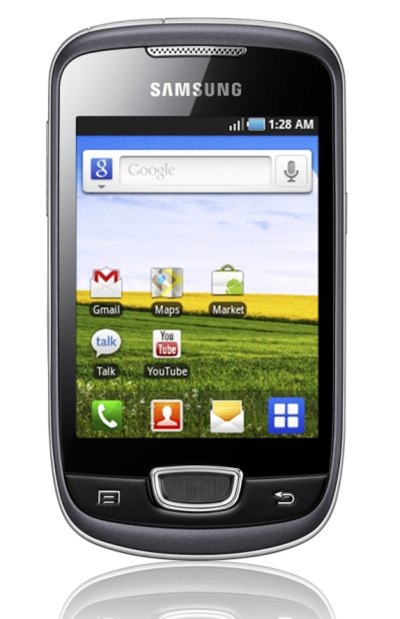
Samsung Galaxy Y vs Samsung Galaxy Pop


Samsung Galaxy Y was launched recently. It is the cheapest Samsung android phone available in India.But this doesn’t make it poor phone. Actually it is a cool phone and its performance is quite impressive. Samsung Galaxy pop is yet another cool phone launched by Samsung 6 months ago. So I decided to compare these two to make the task easier for my friends who are looking to buy a budget smartphone and confused between these two.


 1. Both the phones are having same resolution  240x320 which is not so good. But if you have used low end devices in the past you won’t be disappointed with it.
2. Both the phones are having TFT capacitive touch screen but Galaxy pop is having 3.14” screen and whereas this size in Galaxy Y is 3.0”.Both of these are multi touch and having accelerometer.
3. Galaxy pop is having 160 MB internal memory and in Galaxy Y it is 180 MB so Galaxy Y allows you to install more apps. These can be expanded to 32 GB.
4. Ram in galaxy Y is 290 MB compared to 384 MB of galaxy pop.
5. Galaxy Y is loaded with Gingerbread and Galaxy Pop comes with outdated froyo but it can be upgraded to gingerbread.
6. Galaxy Y is faster with 832 Mhz processor compared with 600 Mhz processor of galaxy pop.
7. Camera in pop is 3.2 MP and in galaxy Y it is 2.0 MP.
8. Both the phones have poor battery life with 1200 mAh li-ion battery. But in Galaxy Y battery will last longer due to small display.
Price: Galaxy Pop- Rs. 8000
             Galaxy Y- Rs. 6990
I am having Samsung Galaxy Pop and till now I am totally satisfied with it apart from battery life.But now I am looking to replace it as there are awesome android budget phones in Market.I would recommend you to buy Galaxy Y if you are not heavy phone camera user.